
Erg Enhancement Levels and Effects
A page for viewing Erg enhancement level by level. Choose an Erg grade and weapon type to see the EXP and Gold needed for each level and that level's effects.
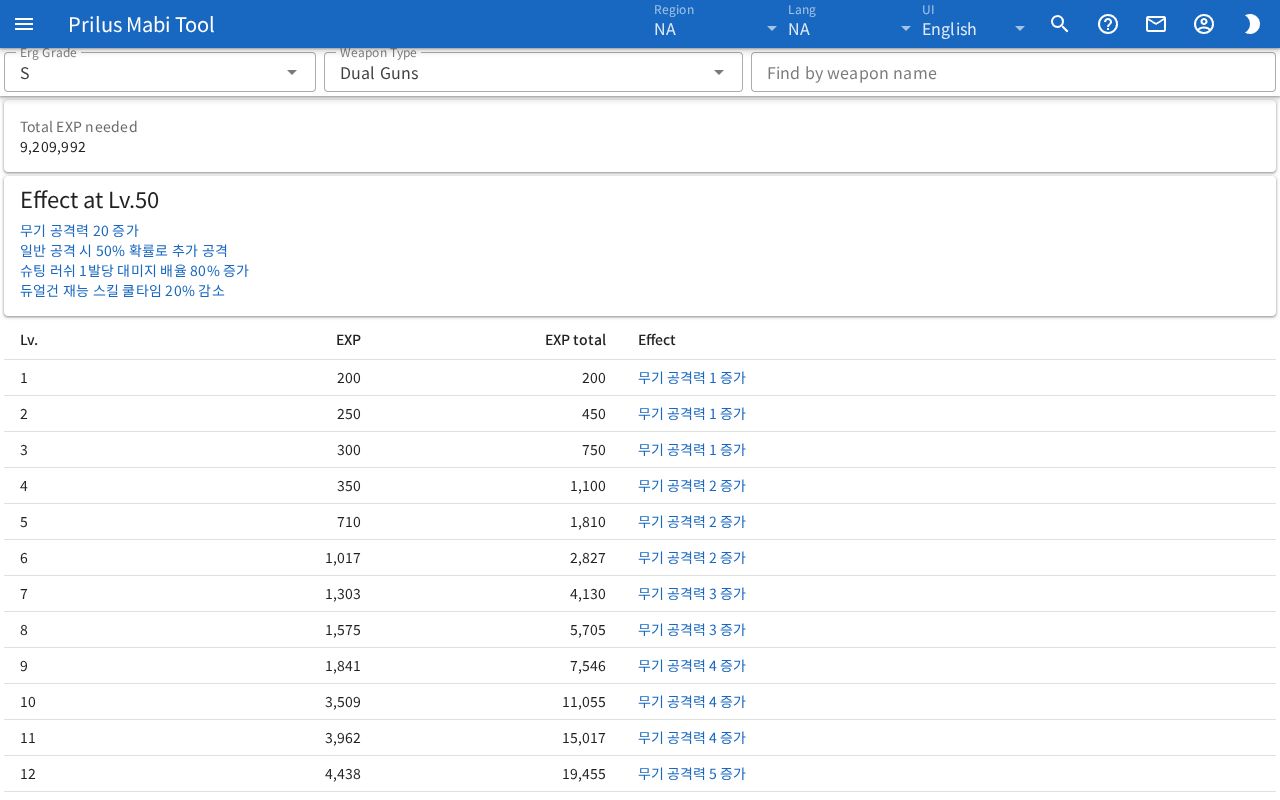
Screen layout
- At the top are the Erg Grade, Weapon Type, and Find by weapon name boxes.
- Below that are the totals of the EXP and Gold needed.
- Below that are the effects at the max level.
- At the bottom is the table by level.
Basic use
- Choose a grade in Erg Grade.
- Choose a weapon type in Weapon Type. If you don't know the weapon type, use Find by weapon name.
- Check the EXP and Gold needed to reach the max level on the totals card.
- Check the EXP, Gold, and effects for each level in the table below.
Choosing the grade and weapon type
- Erg Grade: choose the Erg grade to view.
- Weapon Type: lists the weapon types in the chosen grade. Each weapon type has different effects.
- Find by weapon name: enter a weapon name or ID to see matching weapons on the Matching weapons card. Part of a name also works. Korean names can also be found by their Hangul initial consonants. The weapon type appears next to each weapon name.
- Press a weapon to change Weapon Type to that weapon's type.
- If more than 30 weapons match, only 30 appear, and "Showing 30 of ○" appears below the card.
- If no weapon matches, "No weapon found. It may not accept Erg." appears.
- Clear the box to hide the Matching weapons card.
Totals
- Total EXP needed: the EXP needed for all levels added together.
- Total gold needed: appears only for grades that cost Gold. All the Gold needed added together.
Max level effects
- The card title is "Effect at Lv.○" and it shows the effects you get at the max level.
- If the chosen weapon type has no effect text, "No effect text for this weapon type." appears.
When you choose a Dark Erg grade, this card changes to Total effect.
- At the top, "Erg ○ Lv.○ (kept)" and the effects that stay are shown in faded text.
- Below, "Dark Erg Lv.○" and the added effects are shown in a highlight color.
Max Level Unlock
Appears only for Dark Erg grades.
- The required weapon appears as "Needs a weapon at Erg ○ level 50."
- The table shows each Max Lv. and the Chance of unlocking that max level.
Table by level
- Lv.: the Erg level.
- EXP: the EXP needed for that level. Levels that need no EXP show "-". EXP total is the sum up to that level.
- Gold, Gold total: these columns appear only for grades that cost Gold. Levels that cost no Gold show "-".
- Effect: the effects at that level. In Dark Erg grades, effects that stay are shown in faded text, and added effects in a highlight color.
If the same effect can appear on two lines, "The same effect can appear twice. The two values add up." appears below the table.
Good to know
- Choosing an Erg grade or weapon type changes the page address. Open that address to open the page with that grade and weapon type already chosen.
- Press Erg Enhancement in the item menu to open this page with that weapon's type already chosen.
- In regions with no Erg info, only "No Erg data for this region." appears.