
View Totem Stats
A page that gathers Mabinogi totems in one place. Each totem shows its type, whether it is Extra, Secondary, or Pet, and its stat ranges.
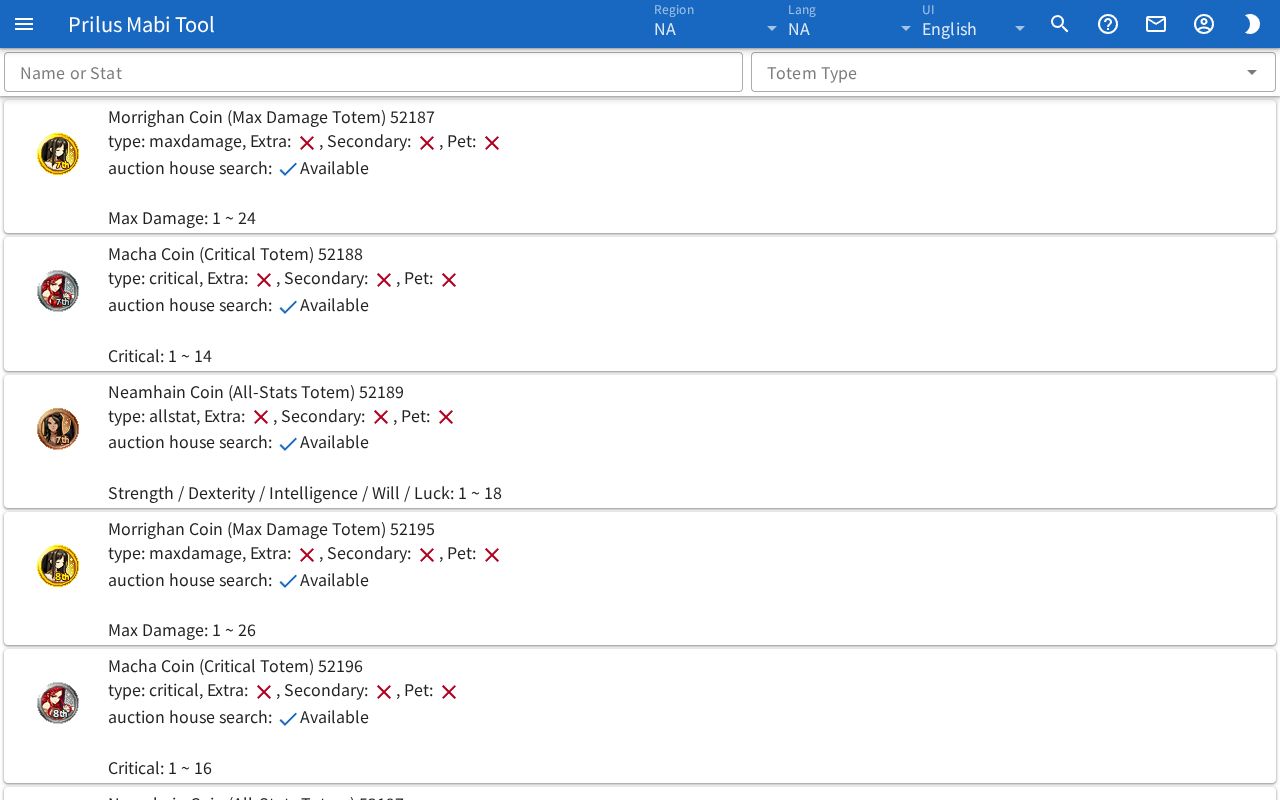
Screen layout
- At the top are the Name or Stat search box and the Totem Type box.
- Below that is the totem list. Each row shows one totem.
- On the left of each row is the totem image.
- To the right of the image, the totem name and ID, type, auction house searchability, and stats appear in order.
Basic use
- Enter a totem name or stat name in the Name or Stat box.
- To narrow down the type, choose types in the Totem Type box.
- Find the totem in the list and check its stats and ranges.
Finding totems
- Name or Stat: enter a totem name or ID to see matching totems. Part of a name also works. Korean names can also be found by their Hangul initial consonants.
- When you enter a stat name, totems with that stat also appear. Totems whose name matches come first, followed by totems whose stats match.
- Stat lines that match the search text appear in a different color.
- Totem Type: press the box to open the type list. You can choose several together. Only totems of the chosen types appear. If you choose nothing, all types appear.
- If you choose several types, the box shows the first type and the remaining count, like "(+2)".
Viewing totem info
- The first line has the totem name and ID.
- The second line has the type, and Extra, Secondary, and Pet each get a check mark if they apply, or an × if not.
- The third line, auction house search, shows Available or Unavailable. Totems with auction house lowest price info are Available.
- Below that, the stats appear one per line as "stat: min ~ max". Stats with a single fixed value show only that value.
- Hover over the totem image to see its description. Click it to open the item menu. Menu entries differ by item. See Item menu for details.