
Arcana Bonuses and Awakening
A page that gathers Mabinogi Arcana in one place. For each Arcana it shows the skills, Link Bonus, Level Bonus, and awakening effects, and it calculates the EXP needed for awakening.
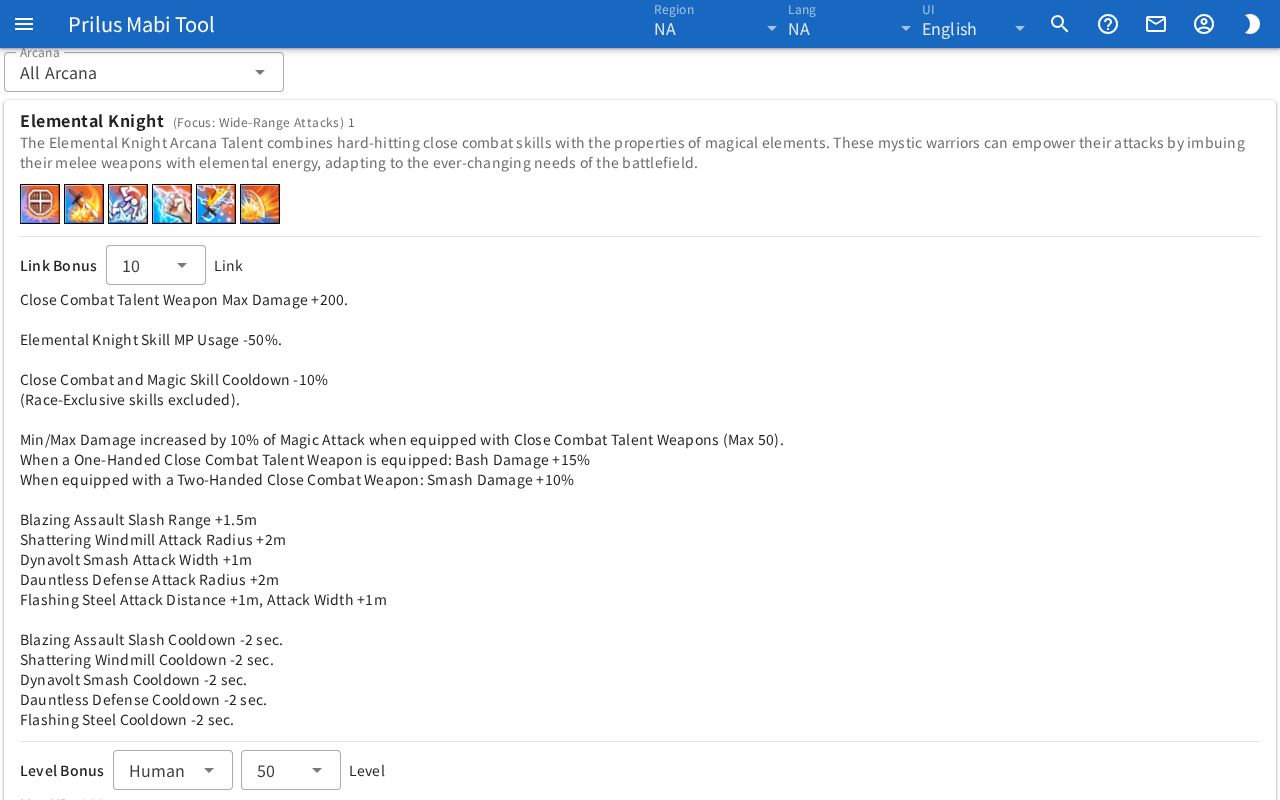
Screen layout
- At the top is the Arcana box.
- Below that is the collapsed Awakening EXP section.
- Below that, the Arcana are listed one per card.
- Each card shows the name, description, skill icons, Link Bonus, Level Bonus, and Awakening, in that order. Parts an Arcana doesn't have are not shown.
Basic use
- Choose the Arcana to view in the Arcana box.
- Only the chosen Arcana's card remains.
- Change the level in the boxes next to Link Bonus, Level Bonus, and Awakening to check the effects.
- To see how much EXP awakening needs, expand Awakening EXP.
Choosing an Arcana
- Choose an Arcana in the Arcana box to see only that Arcana's card.
- Choose All Arcana to see every Arcana.
- The chosen Arcana is saved in this browser. It changes together with the Arcana box on the Ogham page.
- On the Skills page, press a skill's Arcana tag to open this page with that Arcana already chosen. The choice saved in this browser also changes to that Arcana.
Arcana card
Name and skills
- At the top is the Arcana name. Next to it, a keyword in parentheses and the ID appear.
- Below that is the description.
- Below that are the skill icons. Hover over an icon or click it once to see the skill name. On a touch screen, just tap it once.
- Click the same icon once more right after to open the "skill ○○ ID" window. The skill's detailed info appears as a list you can expand.
Link Bonus
- Choose a link level in the box next to Link Bonus to see that level's effects below.
- At first the highest level is chosen.
Level Bonus
- In the first box next to Level Bonus, choose a race from Human, Elf, and Giant. It starts at Human.
- Choose a level in the second box to see the bonuses for that race and level below, one per line.
- At first the highest level is chosen. When you change the race, the level list changes to match that race.
Awakening
- Choose an awakening level in the box next to Awakening to see that level's effects below as "stat +value", one per line.
- Below that, the number of Ogham slots you can use at that awakening level appears as "Ogham slots: ○".
- Arcana with an awakening skill show the skill icon and name next to it. The skill rank at that awakening level appears next to the name. If the level isn't unlocked yet, "from Lv.○" appears.
- Below that, next to Ogham combos, this Arcana's Ogham combo names appear as buttons. Press one to open the "ogham combo ○○" window.
- The awakening level is saved in this browser separately for each Arcana and each data region. It starts at the highest level.
- The awakening level chosen here is the same value as Awakening Level in My Setup on the Ogham page. Changing one changes the other.
Ogham combo window
It opens when you press a button next to Ogham combos.
- At the top are the combo skill icon, the combo name, and the Arcana name.
- Below that are the Ogham words this combo needs, with images and names. Special words have a Special tag.
- Press a score in Rarity Points to see that score's effects below. At first the highest score is chosen. Next to it is the note "Elite 1 / Epic 2 / Master 3, added up".
- For combos with a skill story, press Skill Story at the bottom to expand it.
Awakening EXP
Press Awakening EXP to expand it. If there is no awakening info, this section doesn't appear.
- Choose From and To. At first From is 1 and To is the highest level.
- The EXP needed appears next to them.
- Below that, the note "You can hold up to ○ EXP before injecting it." appears.
- In the table below, check the EXP per run for each dungeon and difficulty and the Runs needed to reach the target.