
View Probability Tables
A page for viewing the published item probability tables. Each table shows what can come out and its probability.
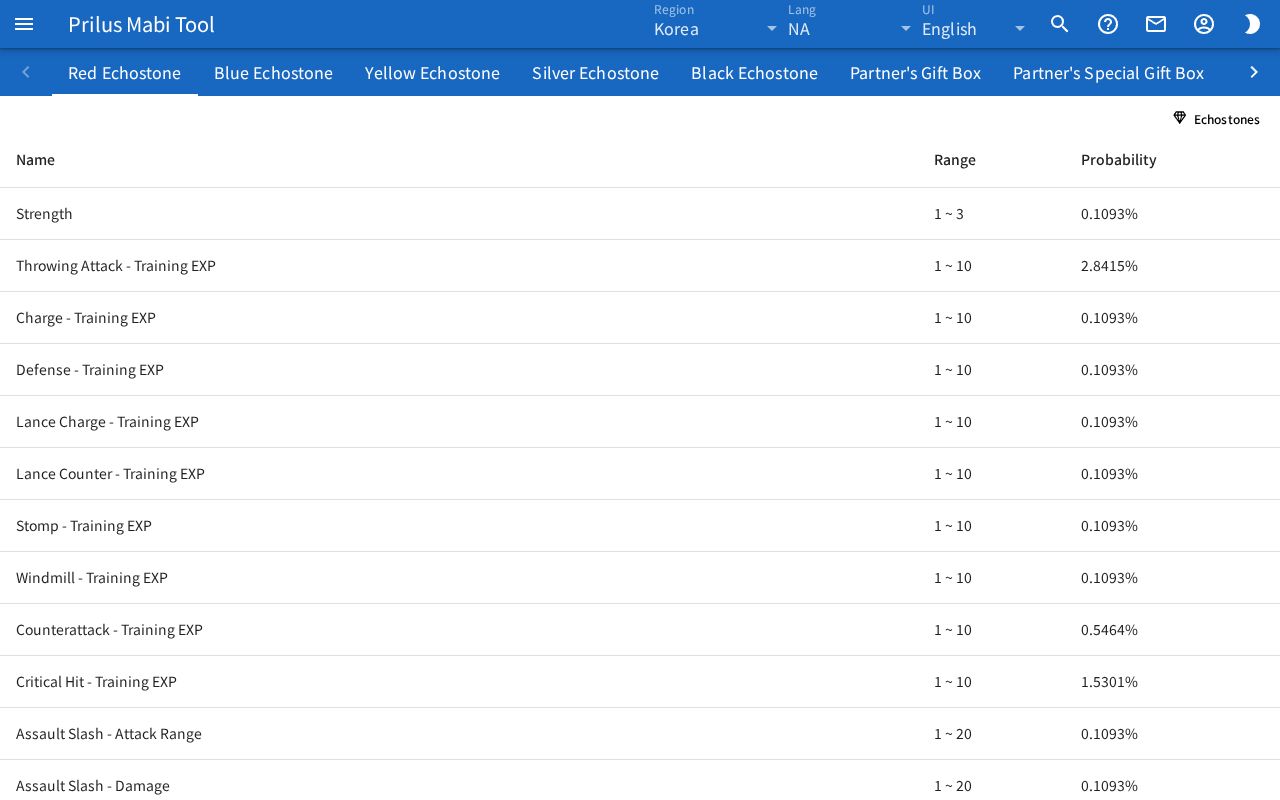
Screen layout
- At the top, the probability table names are lined up as tabs. If there are many tabs, use the arrows on both sides to scroll.
- Below that is the chosen table. Its columns are Name, Range, and Probability.
Basic use
- Press the probability table you want in the tabs at the top.
- Check what can come out and the probabilities in the table below.
Reading the table
- Name: the name of what can come out. In tables that give colors, the color value is added in parentheses after the name.
- Range: when a value is set as a range, it appears as "min ~ max". When it is a single value, only that value appears.
- Probability: shown as a percentage to four decimal places.
- Some tables show the notice "No total for this table. Showing raw weights." at the top. In these tables, the Probability column is not a percentage but the value written in the table as is.
- Echostone awakening probability tables have an Echostones button at the top right of the table. Press it to open the Echostones page with that Echostone already picked.
Opening by address
- When you press a tab, the address in the address bar changes to that table's address. Open this address to open that table right away.
- If the table in the address can't be found, the notice "random table ○○ not found" appears and the first table is shown.
Good to know
- Probability tables can only be viewed in the kr region. If a table has no content, "Random table list can only be viewed in kr region." appears in the table.