
Flashy Dye Preview
Preview how a Flashy Dye's colors change. Pick colors and parameters or enter a dye code, and the Preview shows it in motion.
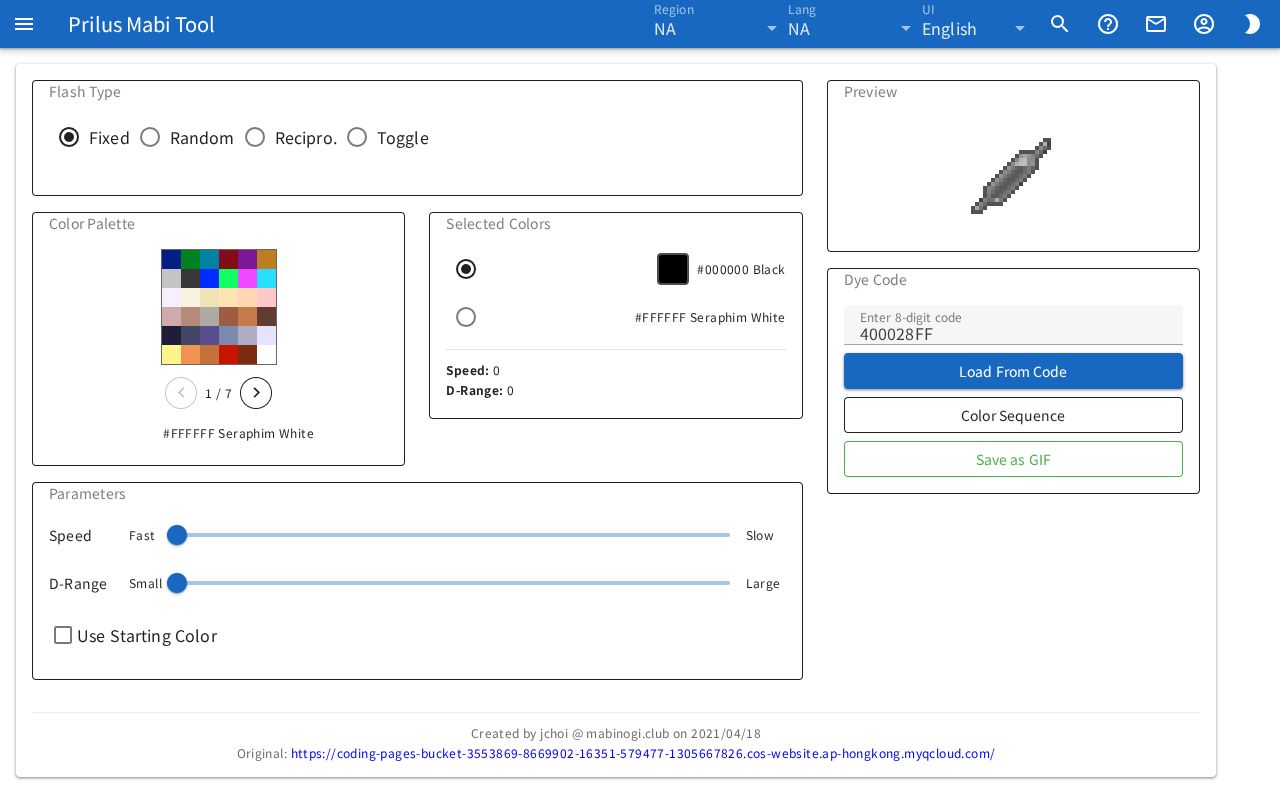
Screen layout
- Flash Type: Choose how the colors change.
- Color Palette: Pick the colors to use for the dye.
- Selected Colors: Shows the two colors you picked and the current parameters.
- Parameters: Set values such as speed with sliders.
- Preview: Shows the colors changing in continuous motion.
- Dye Code: Shows the code for the current settings. You can also enter a code to load it.
Basic use
- In Flash Type, choose one of Fixed, Random, Recipro., and Toggle.
- In Selected Colors, press the circle of the color slot you want to change.
- Click a color in the Color Palette to put it in that slot.
- Fill the other color slot the same way.
- Move the sliders in Parameters to set the values.
- Check how the colors change in the Preview.
When you change the type, pick a color, or move a slider, the Preview and Dye Code change right away.
Flash type
- Fixed, Recipro.: The colors repeat in a set order.
- Random, Toggle: The colors appear at random.
The options shown in Parameters depend on the type.
| Type | Parameters |
|---|---|
| Fixed, Recipro. | Speed, D-Range, Use Starting Color |
| Toggle | Speed, Frequency |
| Random | Speed |
Picking colors
- Hover over the Color Palette to see that color's value and name below the palette.
- Click a color to put it in the slot selected in Selected Colors.
- Selected Colors has two color slots. Press the circle to the left of a slot to choose which one to change.
- The palette is split into several pages. Turn pages with the arrow buttons below the palette.
- You can also turn pages by scrolling the mouse wheel over the palette.
- Right-click on the palette to switch the selected slot to the other slot.
Parameters
Each parameter goes from 0-15, 16 steps in all.
- Speed: The left end is Fast and the right end is Slow.
- D-Range: Shown for Fixed and Recipro.. The left end is Small and the right end is Large.
- Frequency: Shown for Toggle. Color 1 and Color 2 are written at the two ends.
- Use Starting Color: Shown for Fixed and Recipro.. Turn it on to show the Starting Color slider. Turn it off to set the starting color back to 0.
The current values are also shown at the bottom of Selected Colors.
If you set Starting Color to a value other than 0, the notice "The DIY Flashy Dye Mold cannot make a dye whose 4th digit is not 0" appears.
In Fixed, if you set both D-Range and Starting Color to 15, a Special Mode tag appears next to the starting color in Selected Colors.
Dye code
- Enter a code you have in the Enter 8-digit code box and press Load From Code. That dye's type, colors, and parameters are filled in on the screen.
- You can also press Enter in the box to load it.
- Letters you type change to uppercase. Only numbers and A-F can be entered.
- If the code cannot be read, the notice "Invalid code" appears.
- If you enter 8 digits but the first digit is not valid, the notice "The DIY Flashy Dye Mold can only make dyes starting with 4/6/7/8" appears.
- If you load a code that has a starting color value, Use Starting Color turns on. The notice "The DIY Flashy Dye Mold cannot make a dye whose 4th digit is not 0" appears with it.
Viewing the color sequence
Press Color Sequence to see the colors shown in the preview as a list with their color values.
- Fixed, Recipro.: It says "Repeats in the following order". The colors repeat in the order of the list.
- Random, Toggle: It says "The following colors appear randomly".
Press Close to close the window.
Save as GIF
Press Save as GIF to download the preview's motion as a GIF file.
Random and Toggle show colors at random, so they cannot be made into a GIF. For these two types, the button cannot be pressed.
Good to know
- The simulator results are for reference only. They may differ from the actual game.
- Some Flashy Dyes use the Starting Color value. However, you cannot set this value with the in-game DIY Flashy Dye Mold.
- The bottom of the page shows who made this simulator and the original address.