
Scrapbook Collection Checklist
View the entries you can collect in the Mabinogi Scrapbook. Check off the entries you have collected to see what is left at a glance.
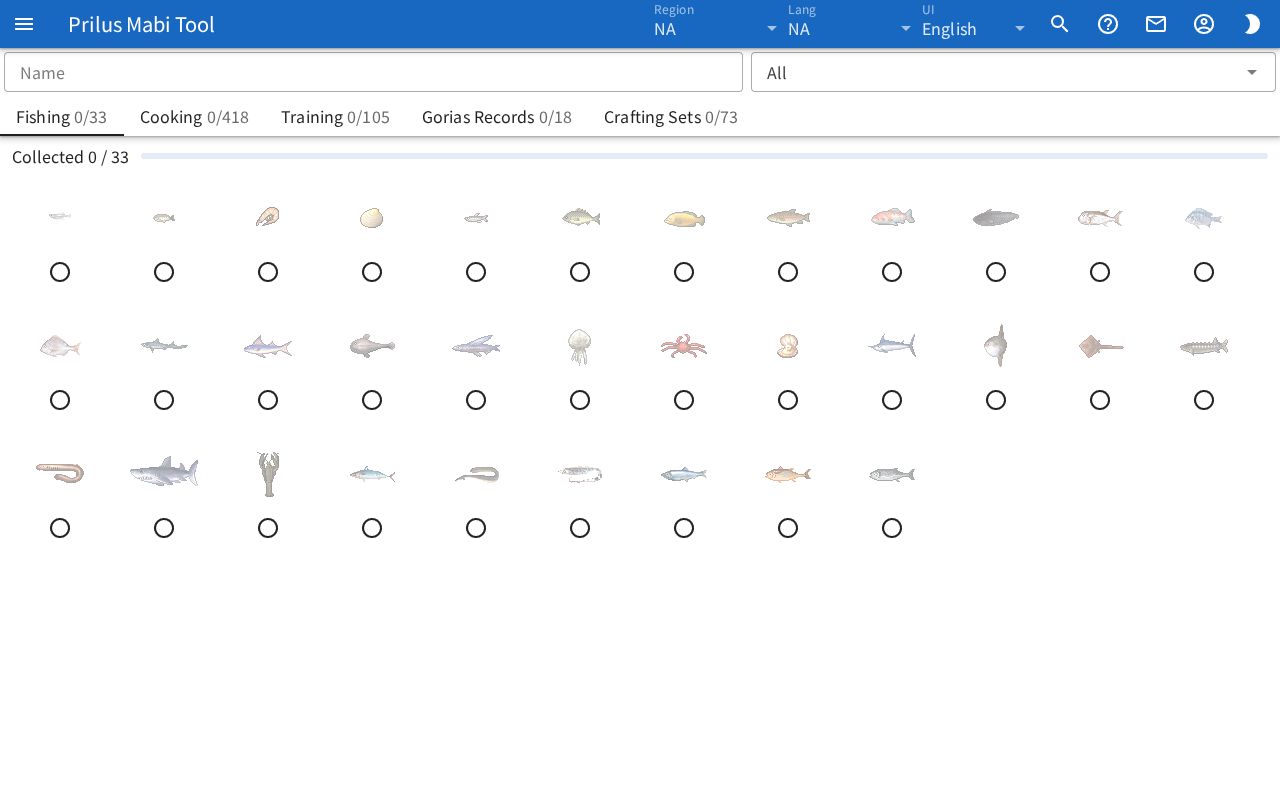
Screen layout
- The Name search box is at the top. Next to it is a box for choosing one of All, Not collected, and Collected.
- Below that are the tabs: Fishing, Cooking, Training, Gorias Records, and Crafting Sets. Next to each tab name, "collected count/total count" is shown.
- Below the tabs are "Collected ○ / ○" for the current tab and a progress bar.
- Below that are the entries of the current tab.
Basic use
- Click a tab to choose what to view.
- Press the circle button of an entry you have collected. The button changes to a check mark.
- To see only what you have not collected yet, choose Not collected in the box next to the search box.
Checking off
- Each entry has a circle button. Press it to check the entry, and press it again to uncheck it.
- When you check an entry, the count next to the tab and the progress bar change right away.
- Your checks are saved in this browser for each region. They stay the same the next time you open the page.
Searching and viewing
- Name: Type a name to show only entries with a matching name. In Crafting Sets, it searches by set name or the names of items in the set.
- In the box next to the search box, choose one of All, Not collected, and Collected. Not collected shows only unchecked entries, and Collected shows only checked entries.
- If no entries match, "Nothing matches." appears.
- If the region you are viewing has no entries for that tab, "No entries in this region." appears.
What each tab shows
| Tab | What it shows |
|---|---|
| Fishing, Cooking | Item images laid out in a grid. Each image has a check button below it. Unchecked items are faded. |
| Training | One per row: the name and description, Combat power, the Success rate range, and the stats raised as a reward. |
| Gorias Records | One record name per row. |
| Crafting Sets | For each set: the name, the collected count, the items to collect, and the reward you get, to the right of the arrow. |
Fishing, cooking
- If there is a "+number" tag next to the check button below an image, that cell can also be filled by other items. Hover over the tag to see those items along with "Any of these also counts:".
Crafting sets
- Each item in a set has a check button. Unchecked items are faded.
- Next to the set name, "collected count/total count" is shown. When all items in the set are checked, the color of this tag changes.
- The count next to the tab and the progress bar count by set. A set with all its items checked counts as collected.
- If there are several rewards, "xcount" is shown below the image.
Hover over an item image to see its description. Click it to open the item menu. Menu entries differ by item. See Item menu for details.