
View Event Shop Items
See the items sold at event shops. Items are grouped by the currency you pay with, so you can see at a glance what your currency can buy.
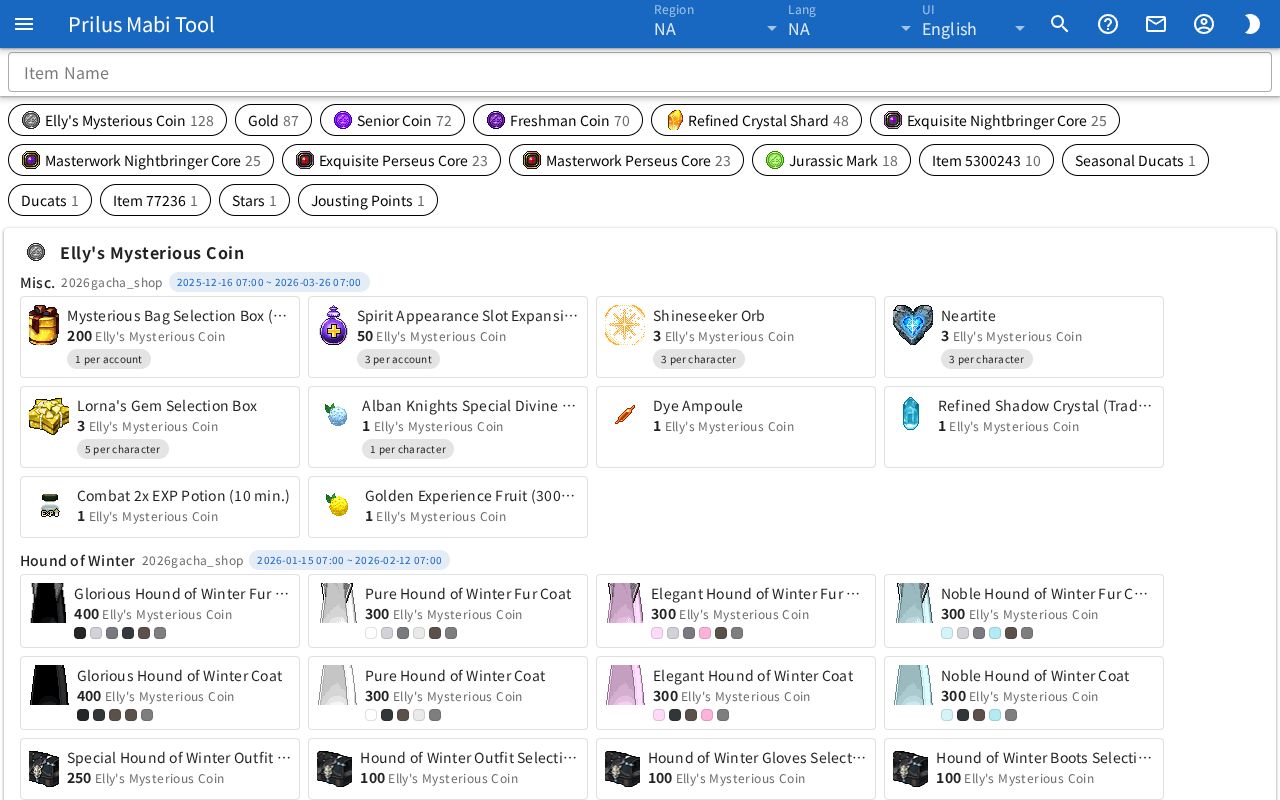
Screen layout
- At the top is the Item Name search box.
- Below that is a row of currency buttons. They appear only when there are two or more currencies.
- Below that is one box per currency. The box title is the currency name.
- Inside each box, items are grouped by shop tab.
Basic use
- Press the button for a currency you have. Only items bought with that currency appear.
- Press the same button again to see all currencies again.
- To find an item, enter its name in the Item Name box.
- Check the price, purchase limit, and sale period in the item's box.
Finding items
- Item Name: enter an item name or ID to keep only matching items. Currencies and tabs with no matching items are hidden.
- Each currency button shows the currency image, name, and the number of items bought with it. Currencies with more items come first.
- A currency can be an event item, or Gold, Stars, Jousting Points, Seasonal Ducats, Ducats, or Rarity Coin.
- Currencies and items with no item info appear as "Item (ID)".
- If no item matches at all, the notice "Nothing matches." appears.
- In regions with no event shops, the notice "No event shop data for this region." appears.
Viewing items
Inside a currency box, there is a group for each shop tab.
- At the top of each group are the tab name and, in small text, the shop name. Some groups have no tab name.
- Tabs with a sale period show the "start ~ end" date and time.
- Each item box shows the item image, name, and price. The currency name follows the price.
- Items sold as a bundle have x and the count after the name.
Depending on the item, small tags appear below the price.
| Tag | Meaning |
|---|---|
| ○ per account | How many one account can buy. |
| ○ per character | How many one character can buy. |
| Stock ○ | The shop's stock. |
| ○ days, ○ hours, ○ min | The duration attached to the item. |
| Type tag | Shown on goods that aren't items. These show # and an ID instead of a name. |
| Color box | Items with a set color show that color as a small box. |
Hover over an item image to see its name. Click it to open the item menu. The currency image in the box title works the same way. Menu entries differ by item. See Item menu for details.