
Talents and Skills
A page that gathers Mabinogi talents in one place. Each talent shows its name, description, and the icons of the skills that belong to it.
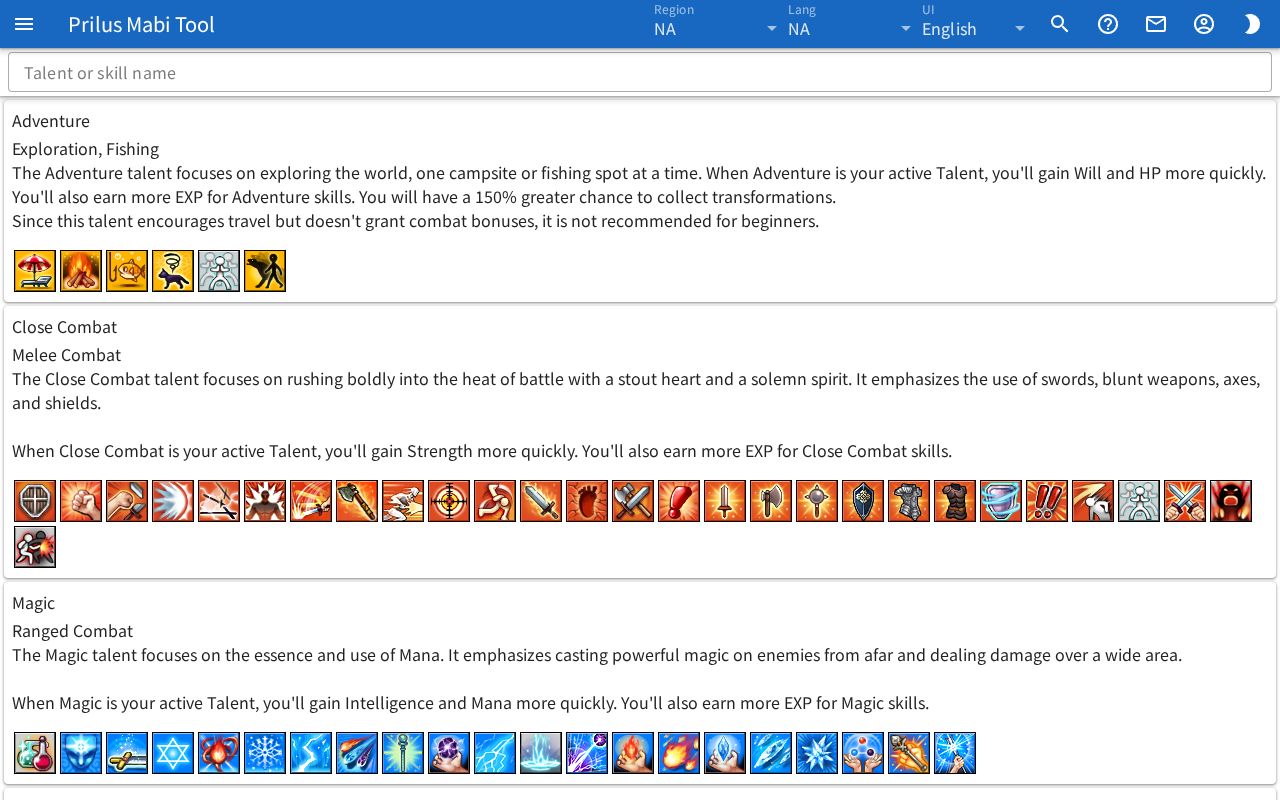
Screen layout
- At the top is the Talent or skill name search box.
- Talents are listed one per card from top to bottom.
- The top of each card has the talent name, a one-line summary below it, and the description below that.
- The bottom of each card has the icons of the skills that belong to that talent, side by side.
Basic use
- Enter a talent name or skill name in the Talent or skill name box, or scroll down the page to find the talent's card.
- Hover over a skill icon at the bottom of a card to see the skill name.
- To see the skill in detail, click the same icon twice in a row.
Search
- Typing in the Talent or skill name box searches by talent name, one-line summary, and the names of skills in that talent.
- When you search by skill name, the talent that skill belongs to appears, and the matching skill icon gets a border.
- If no talent matches, "Nothing matches." appears.
- The search text is also added to the address. Open that address as is to see the list found with the same search text.
- On the Skills page, press a skill's talent tag to open this page searched for that talent name.
Skill icons
- Hover over an icon or click it once to see the skill name below it. On a touch screen, just tap it once.
- Click the same icon once more right after to open the "skill ○○ ID" window. The skill's detailed info appears as a list you can expand.
- If you click again a while after the first click, the window doesn't open and only the name appears again. Click once more then to open it.