
Find Set Effects
Look up set effects. For each set effect, read its description and list the items that have it.
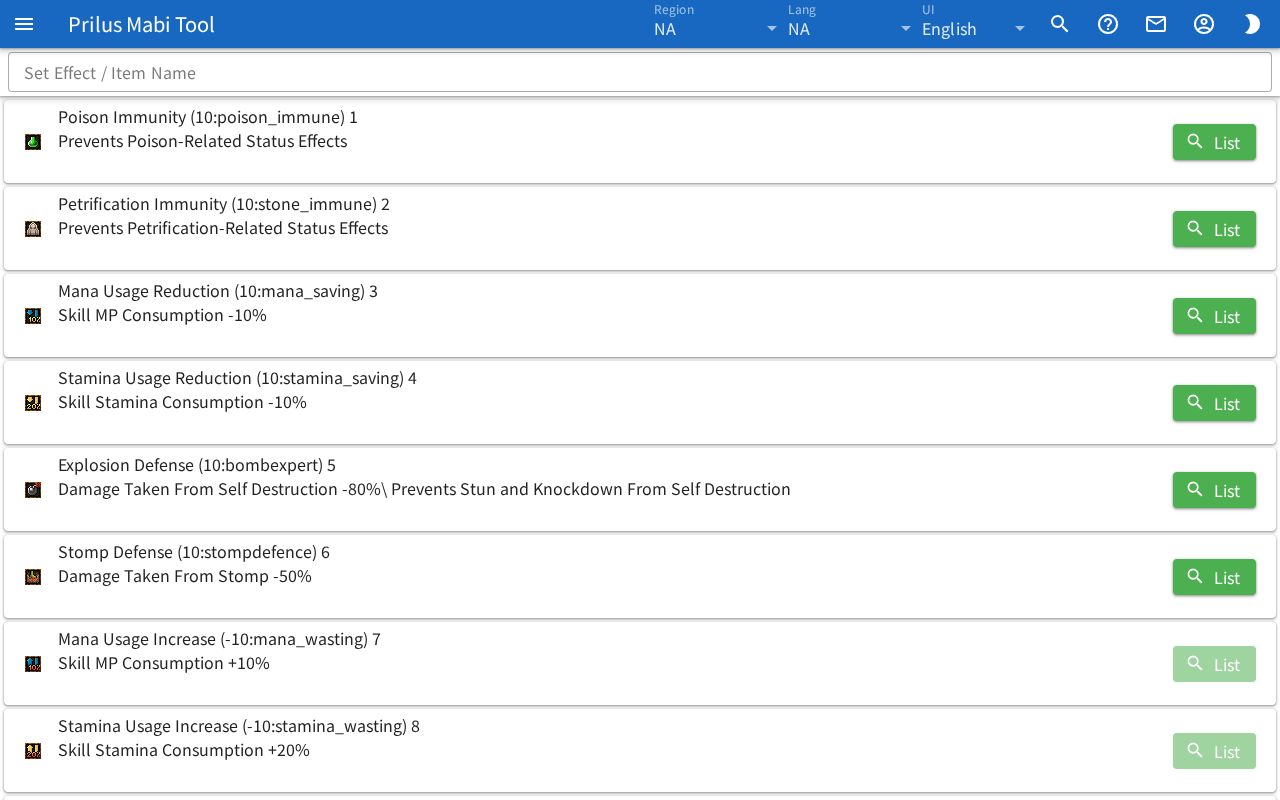
Screen layout
- At the top is the Set Effect / Item Name search box.
- Below that is the set effect list. Each row shows one set effect.
- Each row has the set effect icon on the left, the name and description in the middle, and the List button on the right.
Basic use
- Enter a set effect name or item name in the Set Effect / Item Name box.
- Matching set effects stay in the list.
- Check the effect in the row's description.
- Press the List button to open a window with the items that have that set effect.
Finding set effects
- Search by set effect name, description, or ID.
- You can also search by item name. Set effects on that item appear toward the end of the list.
- Set effects found by item name show "Item: ○○" under the name. It tells you which item matched.
- Press Set Effects in the item menu to see only the set effects on that item in a window. For the item menu, see Item menu.
What each row shows
- After the name, a value in parentheses and the ID appear.
- The description is shown as one continuous line. Highlighted text appears in bold colored text.
- Press the icon to open the "char cond (name) (ID)" window. Hover over the icon to see Info. The detailed info appears as a collapsed list by entry. Press an entry to expand it.
- For set effects with no items, the List button can't be pressed.
Item list window
Press the List button to open the "applied items for (set effect name) (ID)" window.
- At the top are the Item Name search box and the Tradable only and Favorites only switches.
- Below that, items appear one per row. Each row has the item image, name and ID, a star button, and an Info button.
- Press Info to open that item's info window. The star button is for favorites. See Item Search and Info for details.
Hover over an item image to see its name. Click it to open the item menu. Menu entries differ by item. See Item menu for details.