
Food Effect Preview
See the stats and body shape changes each food gives. Feed foods from the list to preview on a character how much the stats go up and how the body shape changes.
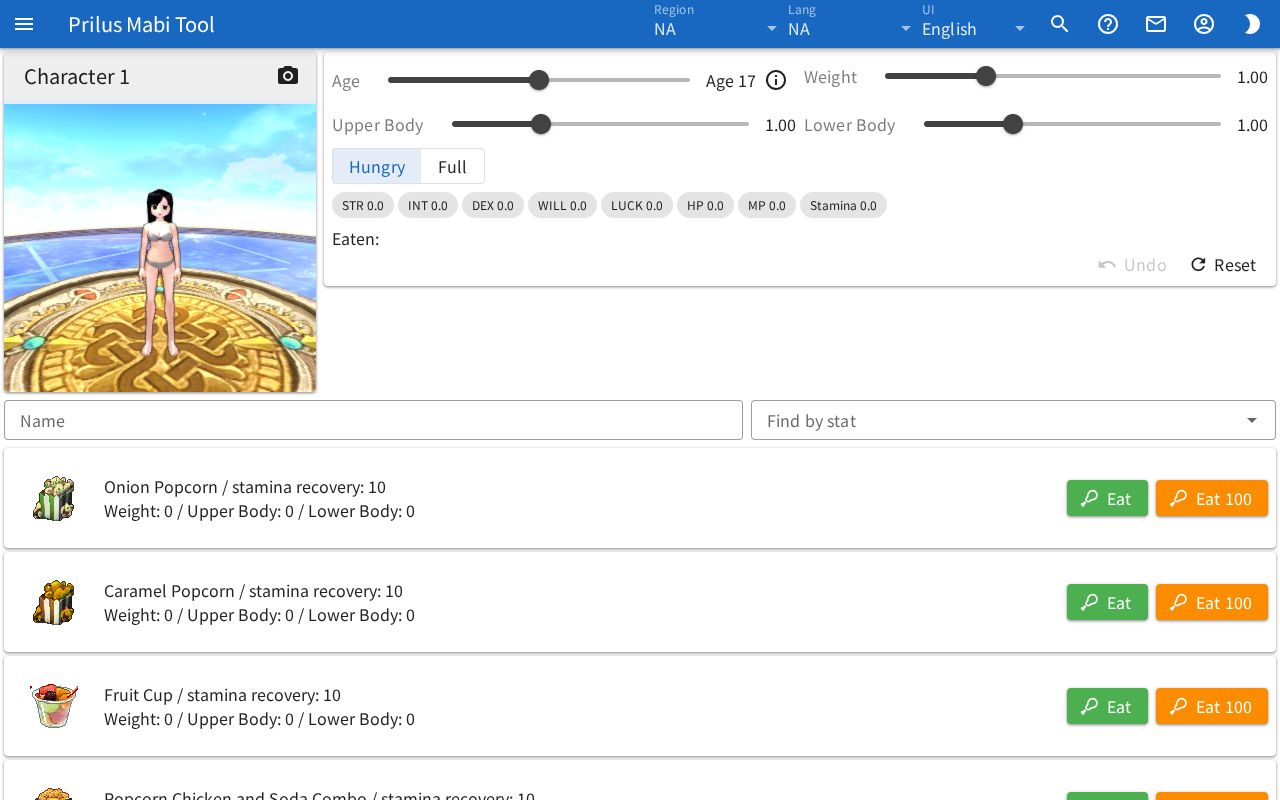
Screen layout
- The character preview is at the top.
- Next to it are the controls for the character's condition: the Age, Weight, Upper Body, and Lower Body sliders and the Hungry and Full buttons.
- Below that are the stats changed by eating and Eaten.
- Below that are the Name and Find by stat search boxes.
- The food list is at the bottom. Each row shows one food.
Basic use
- Set Age and choose Hungry or Full.
- Type a food name in the Name box, or pick the stat you want to raise in Find by stat.
- In the row of the food you found, press Eat or Eat 100.
- Check the changed stats and body shape.
- To start over, press Reset.
Food list
Each row shows the effects of one food.
- The first line has the food name and stamina recovery.
- Below that are the stats it changes. Only the ones that food has among STR, INT, DEX, WILL, LUCK, HP, MP, and Stamina are shown.
- The last line shows how much Weight, Upper Body, and Lower Body change.
- The Eat and Eat 100 buttons are at the right of the row.
- Hover over the food image to see its description. Click it to open the item menu. Menu entries differ by item. See Item menu for details.
Finding food
- Name: Type a food name to show only foods with a matching name.
- Find by stat: Click the box to open a list such as "STR up" and "Weight down". Pick one to show only foods that raise (or lower) that stat, with the foods that change it the most first.
- For Weight, Upper Body, and Lower Body, you can pick up and down separately. Other stats only have up.
- Press the X at the right of the box to clear Find by stat.
- The Find by stat you picked is saved in this browser. It stays the same the next time you open the page.
Trying food
- Press Eat to eat that food once. Eat 100 eats it 100 times at once.
- When you eat, the stat display and the Weight, Upper Body, and Lower Body sliders change. The stat display starts at 0 for everything.
- The result depends on the Age at the time and which of Hungry and Full you chose.
- Eaten keeps a list of the foods eaten so far and how many times, as "name xcount".
- Press Reset to return the stats, body shape, age, and Eaten to the start.
Setting the character's condition
- Age: Pick an age with the slider. It is shown on the right as "Age ○".
- Hover over or click the i button next to the age to see Max Stat Per 5 mins for that age.
- Weight, Upper Body, Lower Body: Set the current body shape with the sliders. The values are shown on the right.
- Hungry, Full: Choose how full the character is when eating.
Character preview
- The first character in the Character Simulator in this browser is shown. If you have never made a character, a default character is shown.
- The starting Age, Weight, Upper Body, and Lower Body are that character's values.
- When you move a slider or eat food, the character's body shape changes right away. Changing Age also changes the height.
- The character's name is at the top of the preview. Press the camera button on the right to return the view so the whole body is shown.
- If the character fails to load, "Could not load the character." appears.