
Skill Info and Rank Tables
Browse skills by category and find them by name. For each skill, see its description and max rank, and choose a race and rank to see that rank's effects. In Ranks, see the AP, bonuses, and training for each rank.
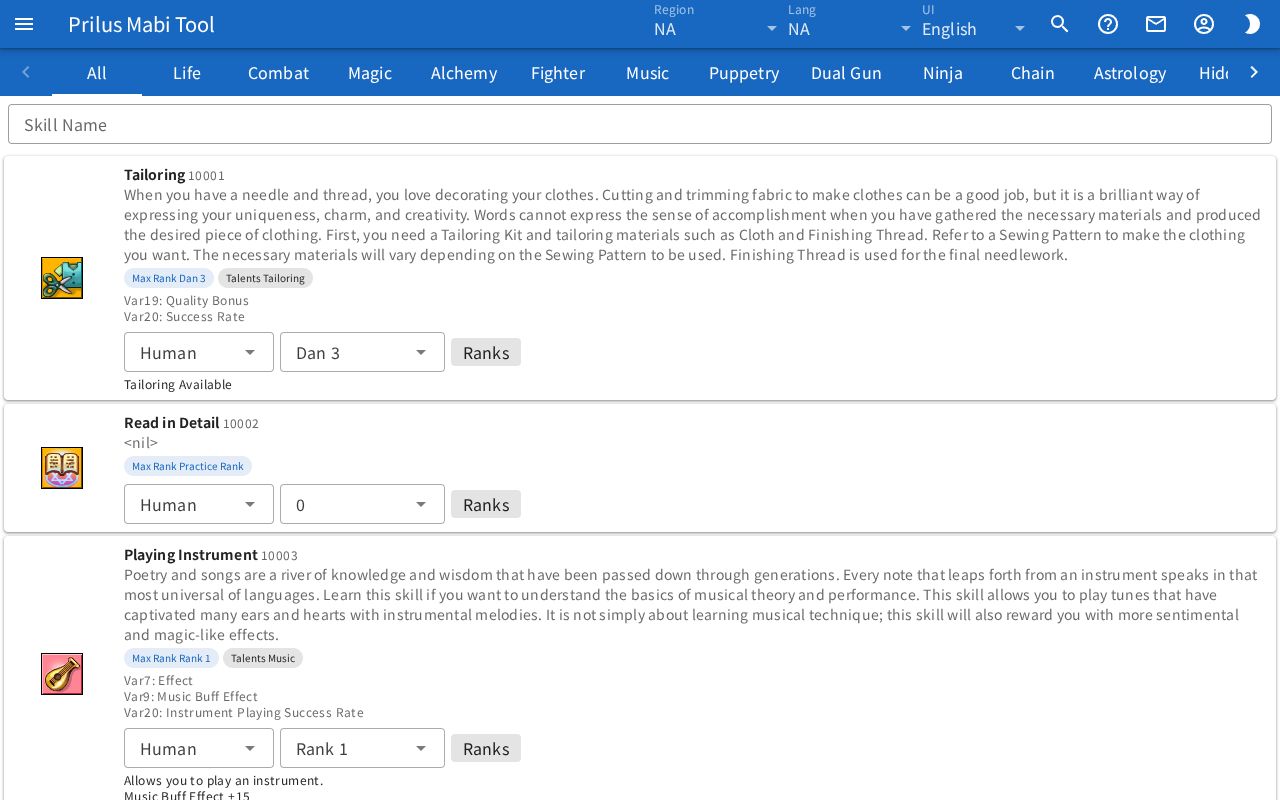
Screen layout
- At the top are the skill category tabs.
- Below that is the Skill Name search box.
- Below that is the skill list. Each row shows one skill.
- Each row has the skill icon on the left, and the skill name, ID, and description on the right.
Basic use
- In the category tabs, press the category to view. The All tab shows every skill.
- Enter the name or ID of the skill you want in the Skill Name box.
- Check the description and Max Rank in the row of the skill you found.
- For skills with effects by rank, choose a race and rank at the bottom of the row to see the effects.
- Press Ranks to open a table with the info for each rank.
Category tabs and search
- There is a tab for each skill category.
- If the tabs don't all fit on the screen, use the arrows at both ends to scroll.
- Skills that don't belong to any category are gathered in the Other tab.
- The Skill Name search looks within the current tab.
- When you press a tab, that category is added to the address. Open the page at this address to open that category tab right away.
- If the category in the address can't be found, the notice "skill category ○ not found" appears and the All tab is shown.
What each row shows
- The ID appears in small text next to the skill name. The skill description is below it.
- The Max Rank tag shows the skill's max rank.
- Skills with combo stacks show Combo Stack Duration and Combo Stack Cooldown in seconds.
- Skills that belong to a talent show a tag with that talent's name, like "Talents ○○". Press it to open the Talents page searched for that talent name.
- Skills that belong to an Arcana show a tag with that Arcana's name, like "Arcanas ○○". Press it to open the Arcana page with that Arcana already chosen.
- Press the skill icon to open the "skill (name) (ID)" window. The skill's detailed info appears as a collapsed list by entry. Press an entry to expand it.
Effects by rank
Skills with effects by rank have two selectors and a Ranks button at the bottom of the row.
- Choose a race in the first box. Only those of Human, Elf, and Giant that have rank info for that skill appear.
- Choose a rank in the second box. At first the max rank is chosen. Only ranks with an effect description appear.
- The effects for the chosen race and rank appear below.
Ranks
Press the Ranks button to open the "skill ranks (skill name)" window.
- If two or more races have rank info, race tabs appear at the top.
- Below that, totals appear as small tags.
- Total AP: the total AP needed up to the last rank.
- To Rank 1: the total AP needed up to Rank 1. It doesn't appear for skills with no Rank 1 or whose last rank is Rank 1.
- For skills with bonuses, the bonuses of all ranks added together appear like "STR +○".
- For each rank, the table shows Rank, AP, Total AP, CP, MP, SP, Cooldown, and Bonus.
- The rank name in the first column is a button with an arrow. Press this button or the table row to expand that rank's effect description, rank description, and Training. Press again to collapse it.
- Training shows each training method as "description — ○% × ○".
- For skills with no rank info, the notice "No rank data." appears.