
Murias Relic Restoration Simulator
A page for viewing the abilities that restoring a Murias Relic can give and trying restoration ahead of time. It also shows the relic enchant lists.
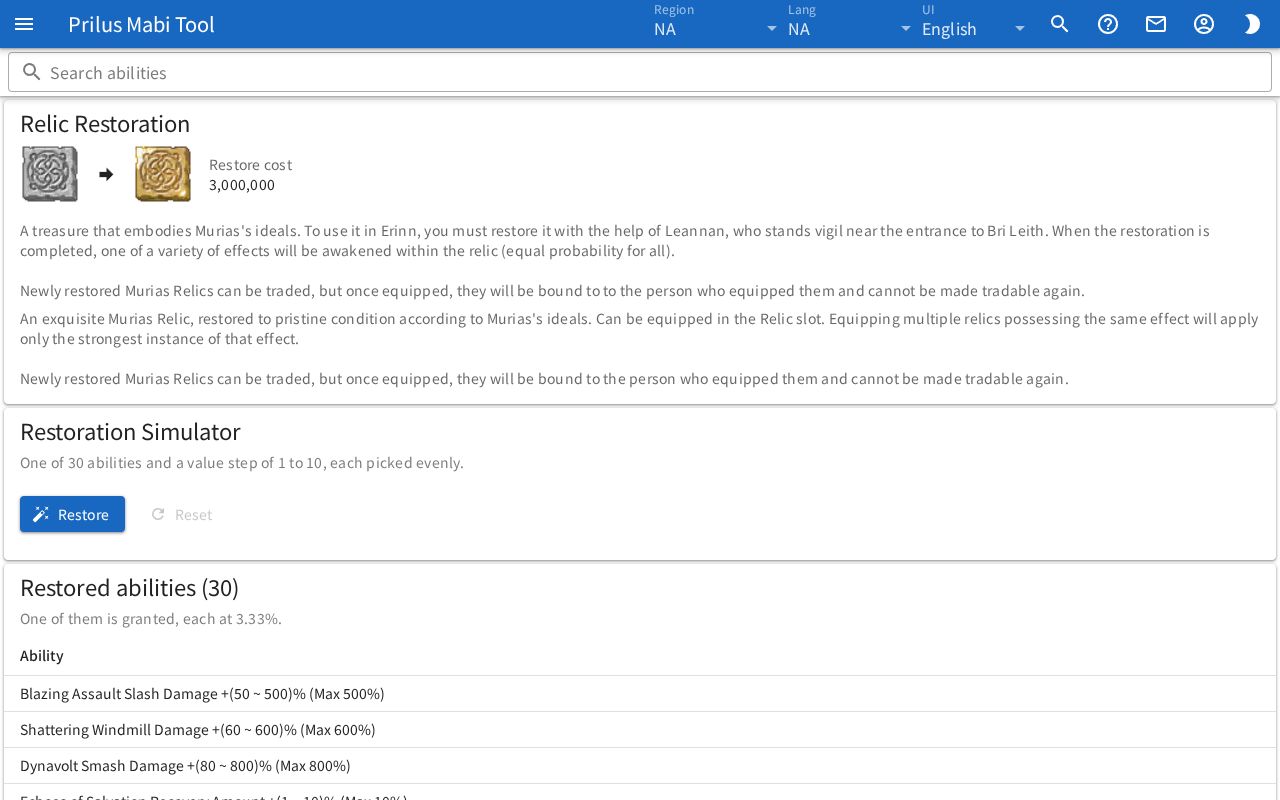
Screen layout
- At the top is the Search abilities box.
- Below that are cards, one after another.
- Relic Restoration: the item used for restoration, the item you get from it, and the Restore cost.
- Restoration Simulator: where you try restoration.
- Restored abilities (○): the list of abilities that can appear.
- Relic Prefix Enchants, Relic Suffix Enchants: the relic enchant lists.
Basic use
- Check the abilities that can appear and their value ranges on the Restored abilities card.
- Press the Restore button in Restoration Simulator.
- Check the ability, value, and step you got.
- Press it several times and check Restores, Gold spent, and Rolled for each ability.
Relic Restoration
- The image on the left is the item used for restoration, and the image right of the arrow is the item you get from it.
- Hover over an item image to see its description. Click it to open the item menu. Menu entries differ by item. See Item menu for details.
- Next to it is the Restore cost. If there is no cost info, it doesn't appear, and Gold spent in the simulator doesn't appear either.
- Below that are the descriptions of the two items.
Restoration Simulator
Above the card it says "One of ○ abilities and a value step of 1 to 10, each picked evenly."
- Press Restore to restore once. Results are random.
- The ability and value you got appear in the box below. Under that, "Step ○ of 10" shows which step the value is. When you get step 10, the box changes color.
- Restores: the number of restorations so far.
- Gold spent: the Restore cost added up for each restoration.
- The table below keeps up to 8 recent results. New results are added at the top.
- Press Reset to bring the count, Gold, history, and Rolled back to the start.
Restored abilities
- The card title shows how many kinds of abilities can appear. Below it, "One of them is granted, each at ○." appears.
- The Ability column shows the ability description. Where the value goes, "(min ~ max)" shows the range of values that can appear.
- After you restore even once, a Rolled column appears. It is how many times that ability came up in the simulator.
- Type in the Search abilities box to see only matching abilities. If nothing matches, "Nothing matches." appears.
Relic enchants
The Relic Prefix Enchants and Relic Suffix Enchants cards show the name and effects of each enchant. A card appears only when it has enchants.
Good to know
- In regions with no Murias Relic info, only the notice "No Murias relic data in this region." appears.